

Getting the BGD99 app onto your phone takes less than two minutes, and it comes straight from the official website, not a random file-sharing link. The APK download and iOS install are both free, and downloading the app also unlocks the App Download Bonus, worth up to ৳9,999.99. It isn’t listed on Google Play or the Apple App Store, so Android uses a direct APK and iOS uses a profile install instead. Here’s exactly how to set up both, plus what to do if something goes wrong along the way.
Is the BGD99 App Safe to Download?
Yes, as long as it comes from the right place. The only safe source is the official website (www-bgd99.net), never a forwarded link, a third-party store, or a file shared on social media. Since the app isn’t distributed through Google Play or the App Store, Android members install a direct APK and iPhone members add a security profile through Safari; both are safe only when the file comes from that official domain. Worth knowing upfront: most ongoing rewards, including the welcome bonus, real-time rebate, VIP program and referral bonus, require you to be logged into the app rather than the browser, so installing it properly the first time saves you from missing out. Members must be aged 18 and over, in line with the GambleAware guidance shown across the site.
How to Download and Install the BGD99 App – Android & iOS
The process is slightly different depending on your device, so follow the section that matches your phone.
Android APK Installation
Android members install the app through a direct APK rather than the Play Store, in a few short steps.
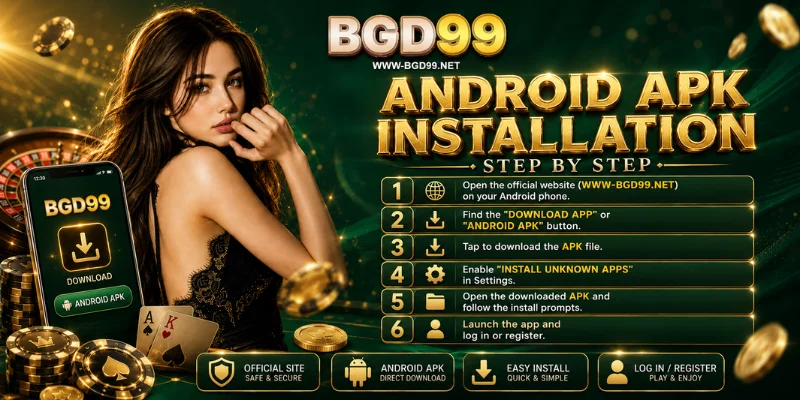
- Open the official website (www-bgd99.net) on your Android phone.
- Look for the “Download App” or Android APK button, usually near the top or bottom of the homepage.
- Tap it to download the APK file to your device.
- Go to Settings > Security (or Apps), and enable “Install unknown apps” for the browser you used.
- Open the downloaded APK from your Downloads folder and follow the install prompts.
- Launch the app and log in, or register if you’re new.
Only ever use the APK you downloaded from the official website. If you find a copy anywhere else, don’t install it, and delete it if you already have.
iOS Profile Install
iPhone and iPad don’t use an APK; the app installs through a security profile added in Safari instead.
- Open the official website in Safari; it needs to be Safari, not Chrome, for the install prompt to work.
- Tap the iOS download or “Install App” prompt on the site.
- Go to Settings > General > VPN & Device Management.
- Find the profile under Configuration Profiles, tap Install, and confirm with your passcode.
- Return to your home screen; the app icon will now be there.
- Open the app and log in or register to start playing.
Play BGD99 on Mobile Browser – No Download Needed
If you’d rather not install anything yet, open www-bgd99.net in Chrome or Safari, and the full site works the same way it does on desktop. It’s a good way to try the games before deciding to install the app, though a few app-only bonuses will need the download later.
What You Get With the BGD99 App
Installing the app opens up features and rewards that aren’t available in the browser version alone.
- Full access to a library of 7,700+ games from 50+ providers, including slots, live casino, fishing, crash games and sports
- Deposits and withdrawals through Nagad, bKash and Rocket, built directly into the app
- App-only rewards: the tiered welcome bonus, real-time rebate up to 3%, VIP1–50 program, referral bonus, and the App Download Bonus itself, worth up to ৳9,999.99
- 24/7 live chat support available inside the app whenever you need help
App Not Installing? Common Issues & Fixes
Most install problems come down to one of these causes.
| Issue | Likely cause | Fix |
|---|---|---|
| Install blocked on Android | “Install unknown apps” not enabled | Turn it on for your browser in Settings > Security, then try again |
| APK file won’t open | Download didn’t finish or file is corrupted | Delete it and re-download from the official website |
| iOS profile won’t install | Wrong browser used | Open the site in Safari, not Chrome, and repeat the steps |
| App won’t open after installing | Device software is outdated | Update your Android or iOS version, then relaunch the app |
If none of these fix it, the 24/7 live chat can walk you through it, so have your device type and account username ready.
Frequently Asked Questions
Is the BGD99 app free to download?
Yes. Downloading and installing it on Android or iOS doesn’t cost anything.
Is the Android APK safe to install?
It’s safe as long as it comes from the official website, not a forwarded link or third-party site.
Why isn’t BGD99 on the Google Play Store?
Real-money gaming apps generally aren’t distributed through Google Play or the App Store, so it uses a direct APK for Android and a profile install for iOS instead.
Can I play without downloading the app?
Yes, the browser version at www-bgd99.net works fully, though some rewards are only available once you’re logged into the app.
Does the app support Nagad and bKash?
Yes. Deposits and withdrawals through Nagad, bKash and Rocket are all available directly inside the app.
Ready to Download the BGD99 App?
Downloading it takes only a couple of minutes, whether you install the Android APK or add the iOS profile through Safari, and it unlocks several ongoing rewards. New members can register in just a few minutes, and once the app is installed, the App Download Bonus is ready to claim straight away.
BGD99 is intended for players aged 18 and older. Please play responsibly and set personal limits; GambleAware resources are available if you ever need support.